
Serv 0.3: a local web server that reads Markdown
Hey everyone!
How often have you had a pile of markdown files sitting in one folder, a whole project’s worth of documentation, and needed to actually read it? Have you ever read raw markdown in your favorite editor? Then this post is for you.
serv just got its v0.3 release, and it can now serve that folder as a site. No config, no static site generator, no npm install. One binary, the -m flag, and your documentation is readable in a browser.
serv is a small server for local development: point it at a folder, open the URL. It has always served HTML, images and everything else, and it served .md honestly as text/markdown — which is to say the browser offered to download it. It doesn’t anymore.
Installing it, and the first run
Homebrew pours a prebuilt binary, nothing to compile:
brew install jwo1f/tap/serv
Or through cargo, if that’s more your habit:
cargo install --git https://github.com/JWo1F/serv
Sources are at https://github.com/JWo1F/serv. The repository has an example folder deliberately stuffed with one of every kind of block; every screenshot below is that folder.
serv -m example
  serv▌ 0.3.0

  ╭──────────────────────────╮
  │  http://127.0.0.1:8099/  │
  ╰──────────────────────────╯

  root         ~/work/jwo1f/serv/example
  contents     2 folders · 2 files · 4.2 kB
  index        no index.html · folders get a generated listing
  not found    built-in page
  urls         clean · /about serves about.html
  markdown     rendered · folders fall back to index.md, then README.md · code plain
  encoding     gzip · text between 1 KiB and 8 MiB
  logs         on

  ctrl-c to stop
Open the address and you get the README — set as a page, not as a wall of hashes and asterisks.
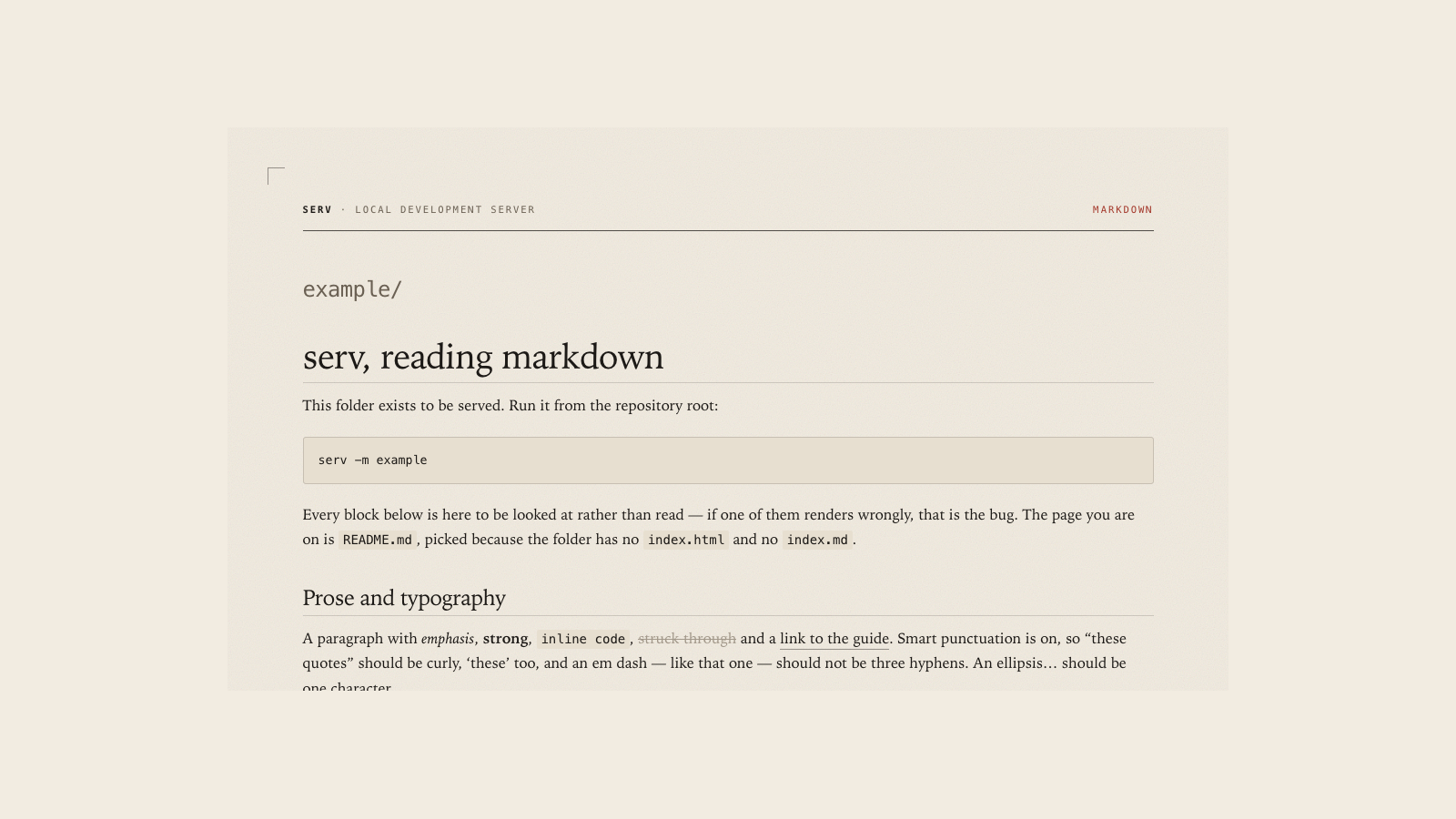
The file is read from disk on every request — nothing is cached inside the server. Fix a paragraph, hit reload, see the fix. That is the same principle serv already applies to every other file; it just reaches your documentation now too.
-m doesn’t add a mode, it widens the rules
The decision that mattered here wasn’t the renderer, it was the routing. serv already did clean URLs: /about serves about.html, and /about.html redirects to /about so a page has one address rather than two. Markdown didn’t get rules of its own — it moved into those.
| Request | What you get |
|---|---|
/about |
about.html, or the rendered about.md when there is no HTML |
/about.md |
301 to /about |
/docs/ |
index.html, then index.md, then README.md, then the folder listing |
/docs |
301 to /docs/ |
HTML always wins. With about.html and about.md side by side you get the first one: the built artifact is the more specific thing.
301 GET  /guide/pages.md                        45 µs
200 GET  /guide/pages                           15.6 kB  296 µs
The third row of that table is the one this was all for. A folder holding a README.md opens as that README, the way a repository does on GitHub. Point serv -m at a project and you get its documentation instead of its file list.
There’s a price, and it’s a direct one: that folder no longer has a listing. At all. No ?listing, no fallback address — I wasn’t going to invent URL parameters serv has never had. A folder is either a document or a table of contents.
A folder with no document in it still draws its own listing:
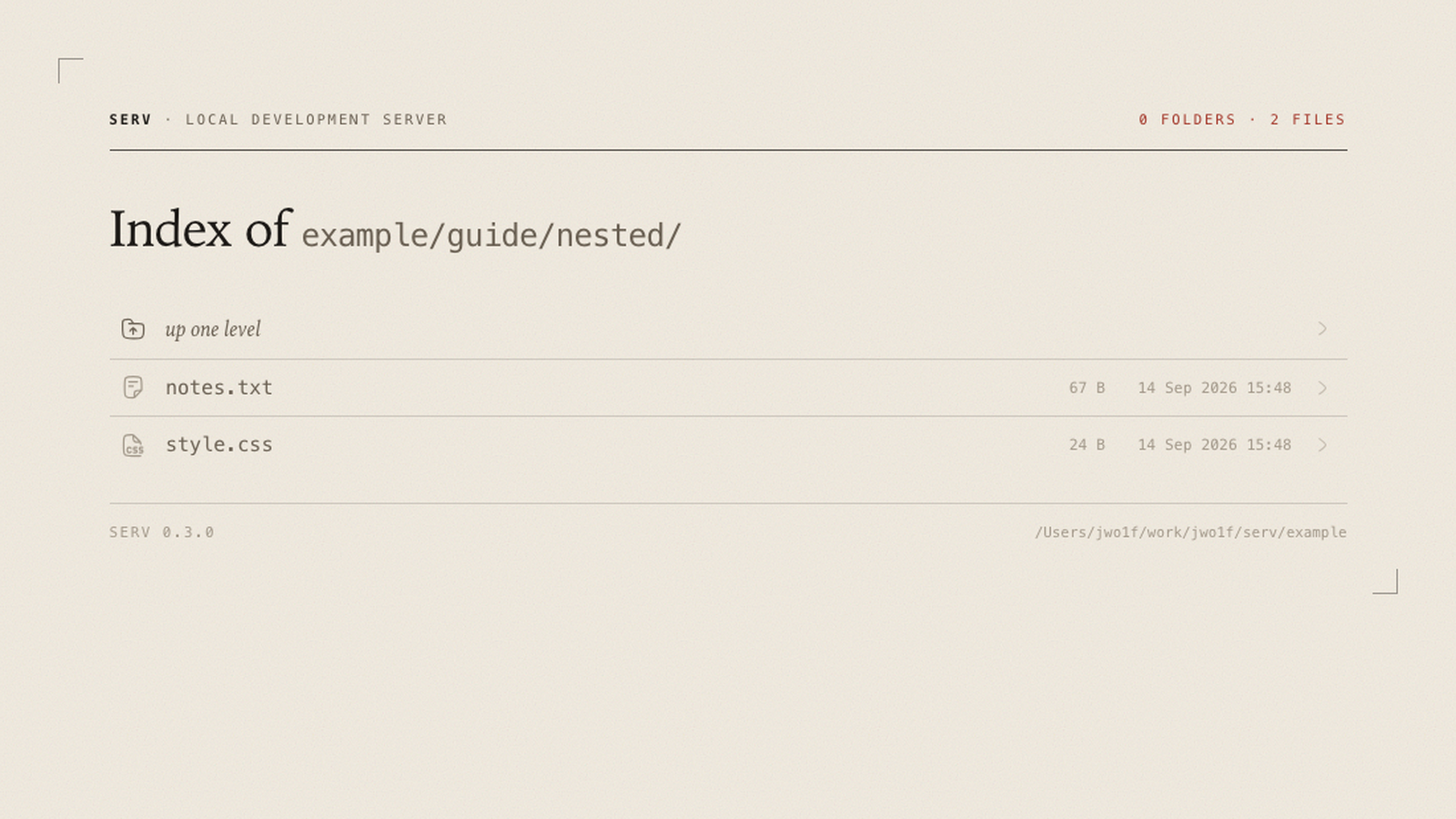
Without -m nothing changes at all. A .md file stays a file, streamed off disk with an ETag and range requests.
Links
Documentation links point at files: [the guide](guide.md). Serve that link as written and the reader goes to /guide.md, gets a redirect to /guide, and does land in the right place — just one request later, with a flicker in the address bar on the way.
So links are rewritten while the page renders: guide.md becomes guide, docs/index.md folds into docs/, and an #anchor or a ?query rides along untouched.
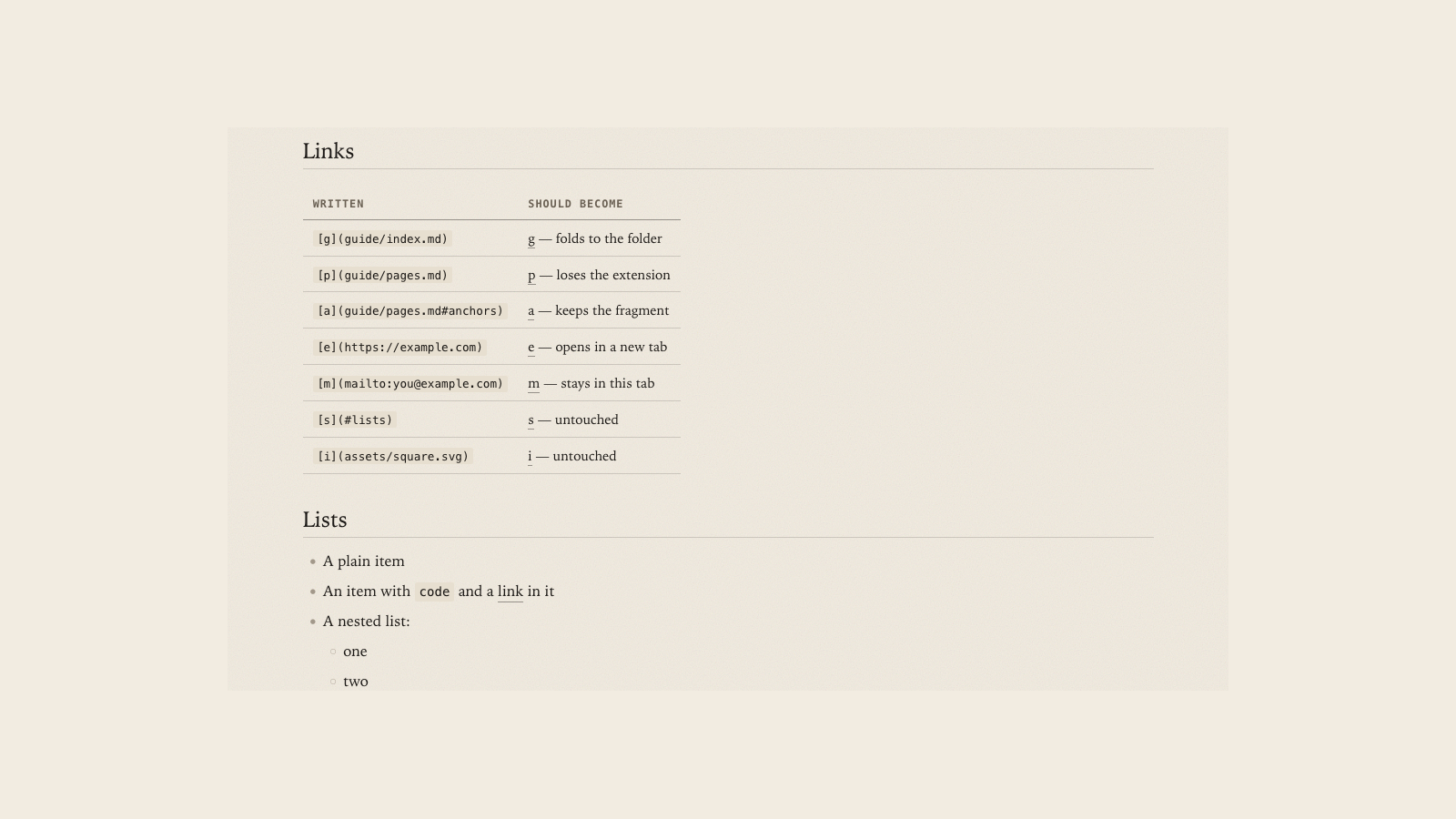
A link off the machine opens in its own tab, with rel="noopener". A mailto: or tel: gets neither: those hand off to a mail client or a phone, and the tab opened underneath them just sits there empty next to your document.
Under -e, where serv serves paths literally, links aren’t touched at all — nothing is being stripped there, so there’s nothing to point somewhere else.
Diagrams
A ```mermaid block is drawn as a diagram rather than set as code.
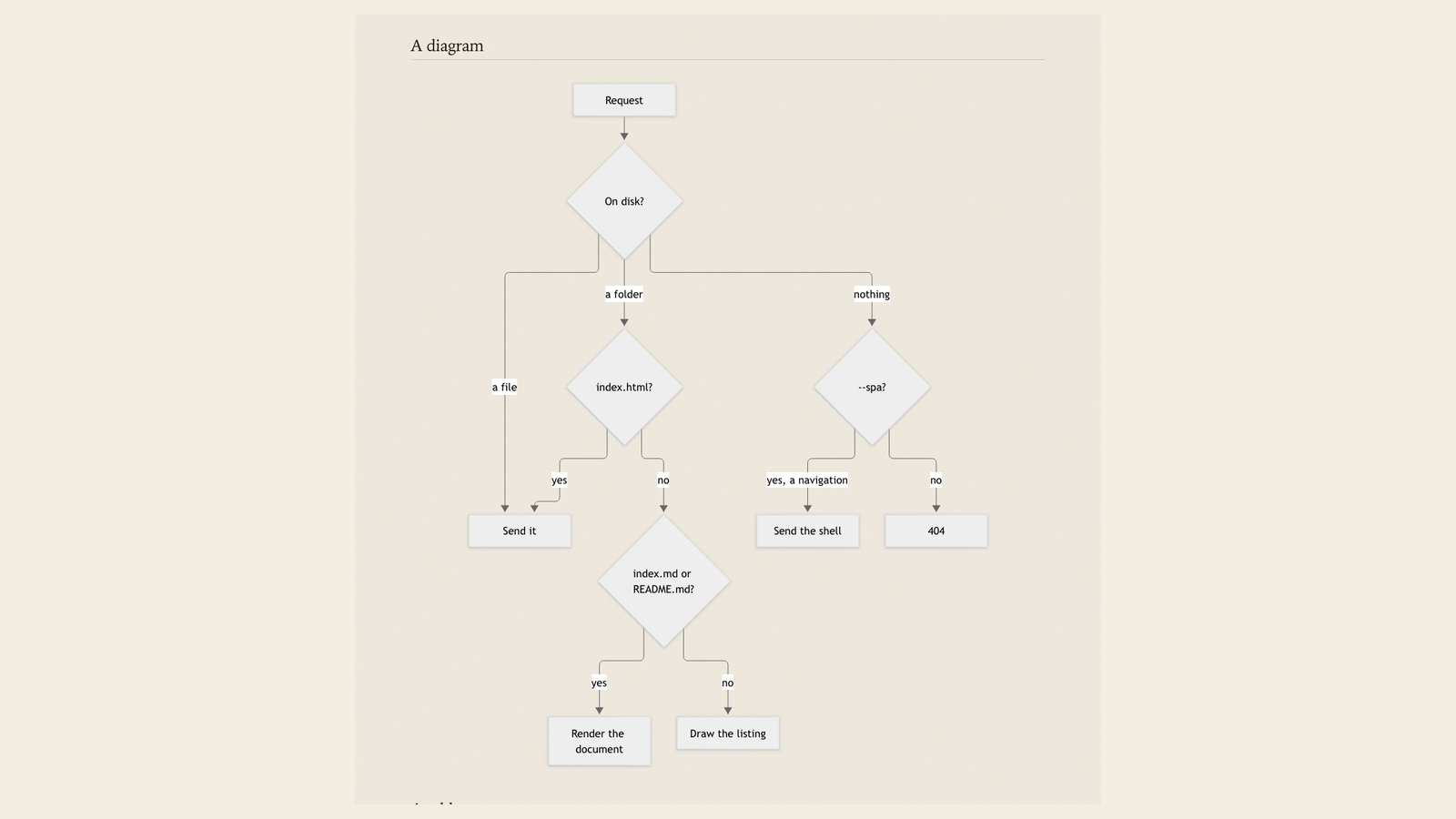
That picture, incidentally, is exactly the logic from the table above — it’s the diagram out of example/README.md, drawn by serv itself.
Now for what it cost. Mermaid exists only as a browser library: there is no Rust port that turns graph TD into SVG, so the only thing that can draw a diagram is JavaScript in the page. A minified mermaid.min.js is 2.62 MB against a serv binary of 1.38 MB, and bundling that for the sake of one block type wasn’t something I was willing to do.
So the page pulls mermaid from jsdelivr, and that is the single place in all of serv that reaches the network. Only a page that actually draws a diagram reaches for it; a document without one asks for nothing. Until mermaid arrives, and if it never does, the block shows the diagram’s own source rather than an empty gap.
Before 0.3 the README said serv never goes to the network. That sentence had to be rewritten.
Syntax highlighting
In the released binaries a code block is plain monospace. Real highlighting lives behind a build flag:
cargo install --git https://github.com/JWo1F/serv --features highlight
Inside it is syntect, with actual TextMate grammars. The price:
| Build | Size |
|---|---|
| 0.1.1, before markdown | 1.11 MB |
| 0.3.0, default | 1.38 MB |
0.3.0, --features highlight |
2.97 MB |
Markdown itself cost 258 KiB — that’s pulldown-cmark. Highlighting adds another megabyte and a half on top: a grammar dump plus a regex engine. For a tool you start in order to read some documentation that’s a lot to carry by default, and perfectly reasonable on request — hence a flag rather than a dependency.
syntect’s output is class-based rather than the inline colors from a theme, so code is painted in the page’s own palette and follows it into dark mode. A language syntect doesn’t know stays an ordinary block.
Where it breaks
A few places I know about and am not fixing.
Raw HTML inside markdown isn’t rewritten: if you wrote <a href="guide.md"> by hand, that link still points at the .md. The renderer never reaches it — it never becomes a link event in the first place. The HTML itself passes through and works, because it’s your file on your machine.
README.md doesn’t fold into its folder. A link to it goes to /README, which is a working address and opens the page. But folding it to ./ the way index.md folds would mean starting to guess, and the guess breaks the day an index.md shows up beside it.
Generated pages — the listing, the 404 and the document — are served without gzip and without an ETag, which means they’re rendered fresh on every request. On localhost that’s a fraction of a millisecond, and a cache would contradict the main promise: what you saved is what goes to the browser.
Why bother, when your editor has a preview
Fair objection: every editor has a preview pane, and for a single file it’s more convenient — nothing to start.
The difference shows up on the second page. A preview shows a file, not a folder: links between documents either don’t work or open the source, relative images resolve only sometimes, anchors are hit and miss. A set of documents is a small site, and it’s easier to read as a site, with navigation and an address bar. On top of that, what the browser shows you can be shown to a colleague by handing them the address.
Under the hood
pulldown-cmark with the GitHub extensions: tables, task lists, footnotes, strikethrough. Plus smart punctuation — serv’s pages are set as a printed sheet, and straight quotes looked wrong on it. Front matter is dropped rather than printed as a heading. Every heading gets an anchor, so the #links any README is full of have somewhere to land.
There are 311 tests in the default build and 316 with --features highlight, and CI runs both configurations: a flag nobody compiles breaks quietly.
Try it
Install it, point it at your own documentation folder, and try to read it.
serv -m ./docs
If something renders wrongly, an issue or a pull request at https://github.com/JWo1F/serv would be welcome. The interesting cases are markdown files that render without an error but incorrectly — those I only find by eye.
Comments 0
No comments yet.